
RightFrom for Microsoft Outlook

Suppose that Microsoft® Outlook® user John Doe has access to his personal mailbox and to the additional mailboxes (usually "Info" <info@company.com>, "Sales" <sales@company.com> etc.) on the Exchange server. To send a new email as Sales, John Doe should populate the From: field with "Sales" manually.
RightFrom automatically fills in the correct From address when the user is responding to a message in another user's Exchange mailbox.
Also RightFrom utility can associate the signatures with the mailboxes. When John Doe navigates to Sales mailbox and clicks the "New message" button, the From: field will be populated automatically with "Sales" and the salesperson (non-default) signature will be added to the message automatically too.
Review these articles: |
Allowing Users to Access Multiple Mailboxes or Creating a Group Mailbox
|
| Current versions: RightFrom2010 ver 1.0.0.11. RightFrom ver 1.0.31. |
Installation
| # | To Do | |||||
| Outlook 2010 | Outlook 2013/2016/2019/2021 | |||||
| 1. | Download RightFrom2010-Demo.zip archive file | Download RightFrom-Demo.zip archive file | ||||
| 2. | Unpack RightFrom2010-Demo.zip | Unpack RightFrom-Demo.zip | ||||
| 3. | Exit Outlook in case it is running. | |||||
| 4. | If you run 32-bit Outlook, execute RightFrom2010Setup_per-user32(DEMO).msi, otherwise execute RightFrom2010Setup_per-user64(DEMO).msi | Run RightFromSetup_per-user.exe | ||||
| 5. | After completing the installation start Outlook. | |||||
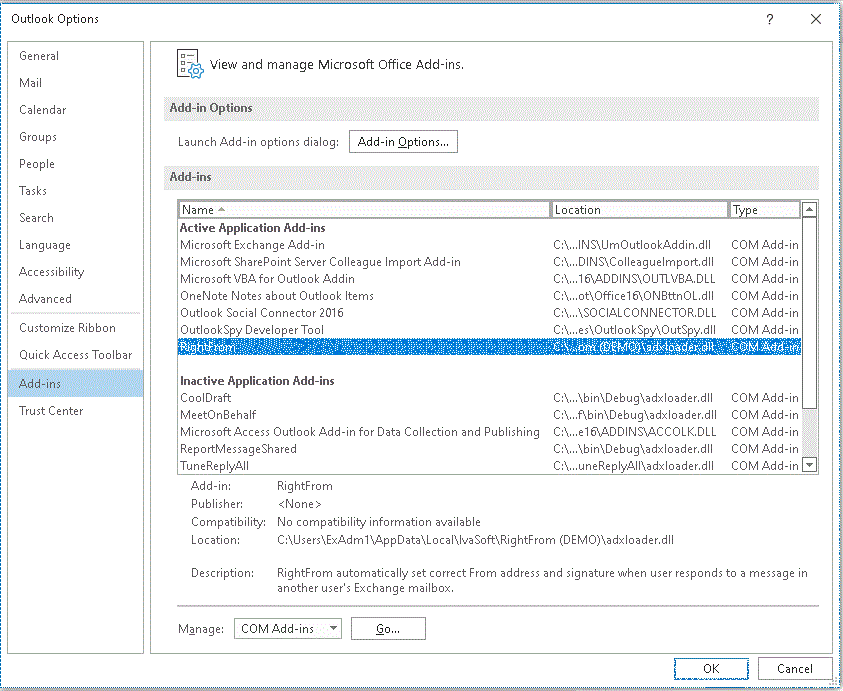
| 6. | Click File -> Options -> Add-ins. | |||||
 |
 |
|||||
| You will see "RightFrom2010" in the list there. | You will see "RightFrom" in the "Active Application Add-ins" list there. | |||||
RightFrom software is distributed as a set of .msi packages and thus can be deployed to computers or users in the organization using Windows Group Policy Software Installation.
Testing
Let's suppose that the primary mailbox name is "John Doe" and SMTP address is "JDoe@domain.com" and the additional mailbox name is "testuser1" and SMTP address is "testuser1@domain.com".
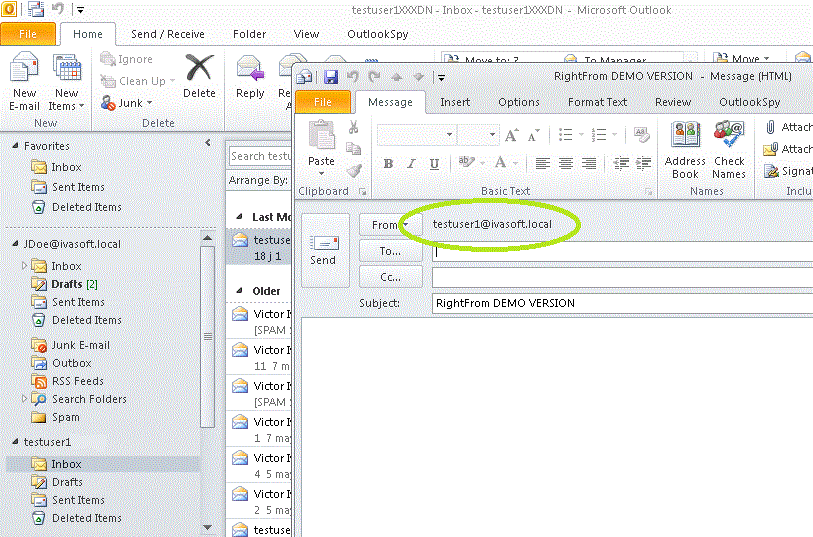
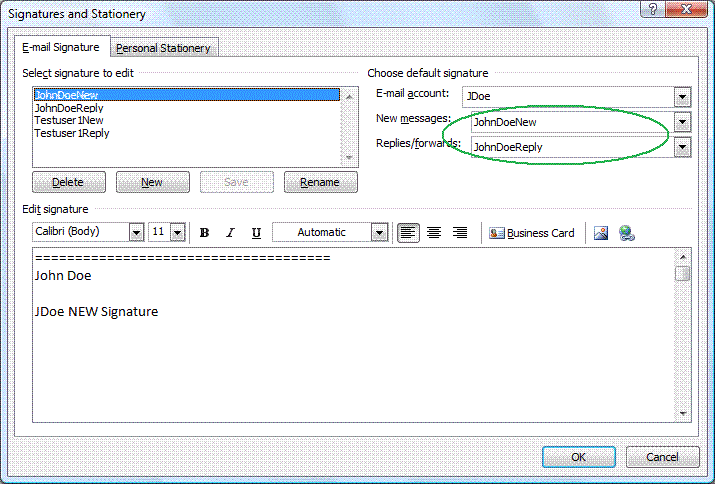
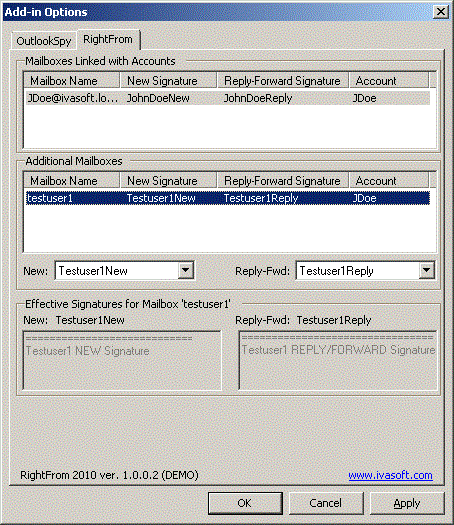
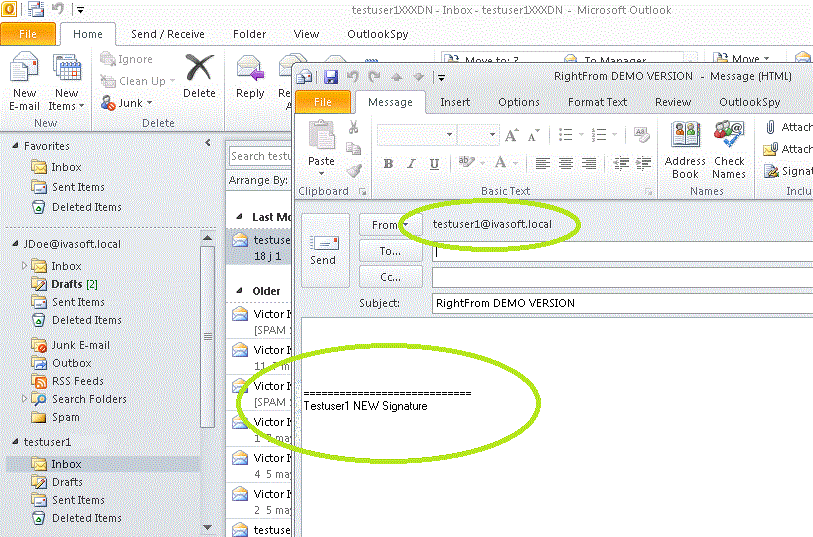

We have tested RightFrom with Outlook 2010/2013/2016/2019/2021 on Microsoft Windows 7, Windows 8 and Windows 10.
It can run on Outlook 365 also.
Uninstallation
You can uninstall RightFrom using Add/Remove programs in the Control Panel.
About this demo version
RightFrom demo version adds "RightFrom DEMO VERSION" phrase to the Subject line of each message that is created in the additional mailbox.
F.A.Q.
Q. I am about to purchase this product but I wondering regarding updates/patches. What are the policies regarding updates? Do you provide them freely or as a purchase?
A. As a registered user, you will get free updates for one year from the date of purchase.
Once the new version is ready, this information will be e-mailed to all registered users. We will send updates via e-mail to those who request them.
Q.
I have already ordered your software and want to view data relating to my order.
A.
Just visit our Customer Care Center.
Prices
Licensing policy: the product is licensed on a per-computer (sometimes called per-workstation) basis.
If you are running Outlook on Windows Terminal Services or Citrix, you should purchase 10 licenses for each Citrix/TS server or a Site license.
| Number of licenses | Individual price |

|
 |
|||
| 1-4 | EUR 35 |  ORDER |
|||
| 5-9 | EUR 30 | |||||
| From 10 | EUR 28 | |||||
| Site license | EUR 1050 | ORDER |
ORDER |
|||
| Enterprise license | EUR 4500 | ORDER |
ORDER |
|||
| All transactions are securely processed by our external registration providers. | Customer Care Center | |||||
Site license covers a single organization in one location (building complex). If you purchase a site license, you may use the program in an unlimited number of your company's computers within this area.
Enterprise license covers all computers of single organization world-wide. If your company has many branches even with thousands of machines, Enterprise license covers them all.
If you are running Outlook on Windows Terminal Services or Citrix, you should purchase 10 licenses for each Citrix/TS server or a Site license.