
SendAsGroup for Microsoft Exchange 2007/2010/2013/2016

Updated: 12-September-2014 |
See also: |
Consider a firm ABC running Microsoft® Exchange 2007/2010/2013/2016. The Accounting department staff has their own mailboxes (user@company.com) and they are Outlook users. Their e-mail is handled through generic department distribution group (accounts@company.com), which ensures that all users receive each e-mail message. For internal mail they want to be able to send e-mail as each individual user, however when this user sends e-mail out of the office, the From address needs to be set to the address of the distribution group (accounts@company.com). This should be done automatically on Exchange server side.
Optionally, to send an external message personally, the user should set the message Sensitivity parameter to "Personal", "Private" or "Confidential".
Using SendAsGroup application would solve the problem.
Current version: 1.0.0.4 Now it supports iOS (iPhone etc) or Android-based devices.
Installation
On your Exchange 2007/2010 Hub Transport Server or Edge server computer or on your Exchange 2013/2016 Mailbox Server computer do the following:
1. Select (or create) a user account that is a member of the local Administrators, Domain Admins and Domain Users security groups.
2. Log on locally as that user.
3. Create C:\Program Files\IvaSoft\SendAsGroup\ directory and download there SendAsGroup2007-Demo.zip archive file.
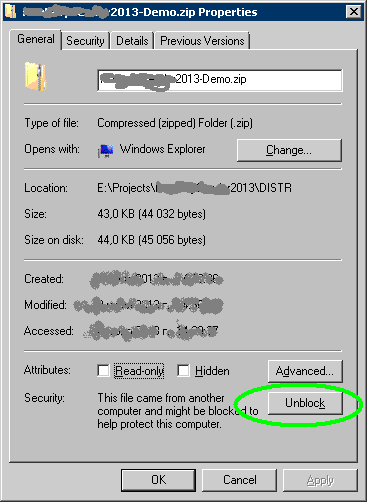
5. Right-click SendAsGroup2007-Demo.zip and select 'Properties'. If there is enabled 'Unblock' button, hit it.
6. Extract all files.
7. Run a command prompt. If you are running Exchange 2007, navigate to C:\Program Files\IvaSoft\SendAsGroup\Ex2007 directory. If you are running Exchange 2010/2013/2016, navigate to C:\Program Files\IvaSoft\SendAsGroup\Ex2010 directory.
8. Run SendAsGroupSetup.exe. Click Install button. Make sure that 'SendAsGroup2007' is appeared in the list of Transport agents. Click Enable button. Click Exit button to close the program.
Testing
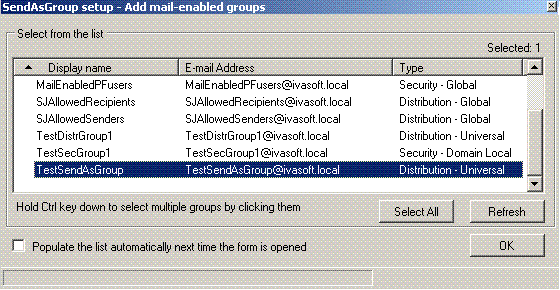
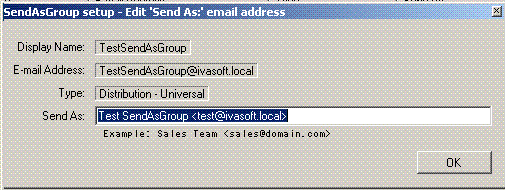
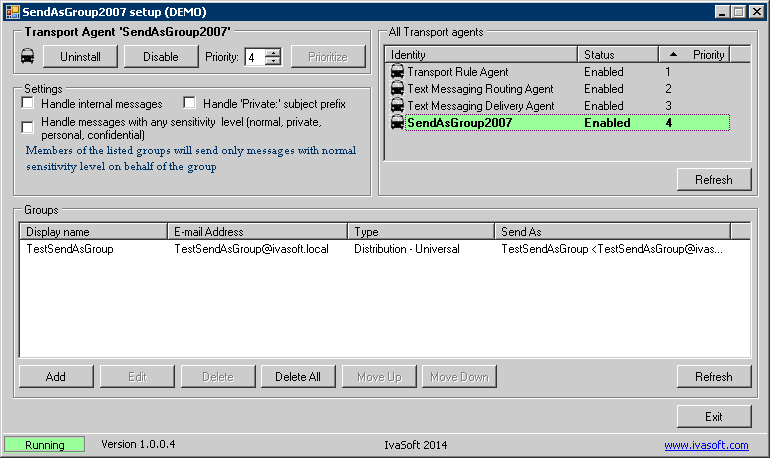
By default SendAsgroup application handles only external messages. If you wish to handle internal messages too, run SendAsGroupSetup.exe and mark "Handle internal messages" check box.
Also by default SendAsgroup application handles only messages whose sensitivity level is set to normal. If you wish to handle any message regardless of its sensitivity level, run SendAsGroupSetup.exe and mark "Handle messages with any sensitivity level" check box.
If you are planning to use the iOS (iPhone etc) or Android-based devices that do not support sensitivity levels, you can check "Handle 'Private:' subject prefix" box. Now, to send from a personal address, you have to place "Private:" prefix to the subject line.
Uninstallation
Run SendAsGroupSetup.exe. Click 'Uninstall' button. Click Exit button to close the program.
About this demo version.
SendAsGroup demo version adds "[SendAsGroup 2007 DEMO]" to the Subject line of each message processed.
F.A.Q.
Q. I am installing this product on a 64bit machine. I followed the directions and tried them from the "Program Files" folder. I got the following error:
"install.ps1 is not digitally signed".
A. Set WSH to unrestricted mode as described here.
Q. What if a message sender belongs to several groups? Which group addreess will be used?
A. SendAsGroup scans the groups from top to bottom in the list. If user1 is a member of groupA and groupB, and groups are sorted as shown here:
groupA groupA@domain.local
the address of groupA will be set. But in this case:
groupB groupB@domain.local
groupB groupB@domain.local
the address of groupB will be set.
groupA groupA@domain.local
You can change the order of groups using Move Up and Move Down buttons.
Q. I am about to purchase this product but I wondering regarding updates/patches. What are the policies regarding updates? Do you provide them freely or as a purchase?
A. As a registered user, you will get free updates for one year from the date of purchase.
Once the new version is ready, this information will be e-mailed to all registered users. We will send updates via e-mail to those who request them.
Q.
I have already ordered your software and want to view data relating to my order.
A.
Just visit our Customer Care Center.
Prices
Licensing policy: the product is licensed on a per-Exchange server basis.
| Number of licenses | Individual price |

|
 | |||
| 1-2 | EUR 200 |  ORDER | ORDER | |||
| From 3 | EUR 150 | |||||
| Site license | EUR 5000 | ORDER | ORDER | |||
| Enterprise license (including the source code) | EUR 21000 | ORDER | ORDER | |||
| All transactions are securely processed by our external registration providers. | Customer Care Center | Customer Support Center | ||||
Site license covers a single organization in one location (building complex). If you purchase a site license, you may use the program in an unlimited number of your company's computers within this area.
Enterprise license covers all computers of single organization world-wide. If your company has many branches even with thousands of machines, Enterprise license covers them all.